
Your Laptop Is Now a Target – Why Twice‑Yearly Hardware & Software Checks Are Essential in 2026
Dust clogs fans. Firmware goes outdated. Backups fail silently. And most people don't know until the crash.
LAPTOP UPGRADELAPTOP REPAIR CENTRE
IT-UK Tech Team Amersham
5/3/20266 min read
Your Laptop Is Now a Target – Why Twice‑Yearly Hardware & Software Checks Are Essential in 2026
Hardware + software deep check every 6 months. Stop waiting for a crash.
The Laptop You Trust Is Being Watched
You use your laptop for everything. Banking. Work. Medical records. Private conversations. Family photos.
It is no longer just a device. It is the front door to your digital life.
And the digital world is no longer just "the internet." It is a crowded, dangerous place where threats evolve faster than most people can keep up.
Ransomware attacks rose 95% last year. One in three laptops has outdated critical firmware – the kind antivirus cannot see. And 42% of backup drives are silently failing right now, meaning you think you are protected, but you are not.
You would not leave your front door unlocked for six months. So why leave your digital life unprotected?
This is why The 6-Month Shield exists. Twice a year – like clockwork – we check your laptop's hardware and software. Not a quick tune-up. A full, preventive deep clean and security overhaul.
Here is exactly what that looks like, why it matters, and how it saves you money, time, and heartache.
The New Digital Reality: You Are a Target
Let us be blunt. Hackers do not care if you are "just a normal person." They target everyone. Automated attacks scan millions of devices every hour, looking for one weak spot.
That weak spot is often outdated firmware – the low-level software that runs your hard drive, Wi-Fi card, and battery. Your operating system does not update these automatically. Antivirus does not scan them. And after six months, most laptops have accumulated several critical firmware vulnerabilities.
At the same time, dust and heat are silently destroying your hardware. A laptop that feels "a little warm" is actually running at reduced speed to avoid melting itself. By month six, performance has often dropped 20-30% – but you have just gotten used to it.
And then there is your backup. You set it up once, years ago. You never check it. Statistically, there is a 42% chance it has already failed.
This is the new digital reality. Ignoring it does not make it go away. It just means you will discover the problem after the crash, not before.
What "Twice a Year" Actually Means
Most people think laptop maintenance means running a virus scan or clicking "remind me later" on a software update. That is not enough.
The 6-Month Shield is split into two focused visits – one for hardware, one for software – every six months.
Spring Visit – Hardware Deep Clean
Internal dust extraction – We open your laptop and remove dust that blocks fans and heat sinks. This prevents 70% of overheating-related deaths.
Thermal paste check and fan test – Dried thermal paste causes CPU throttling. A failing fan sounds fine until it stops completely. We catch both early.
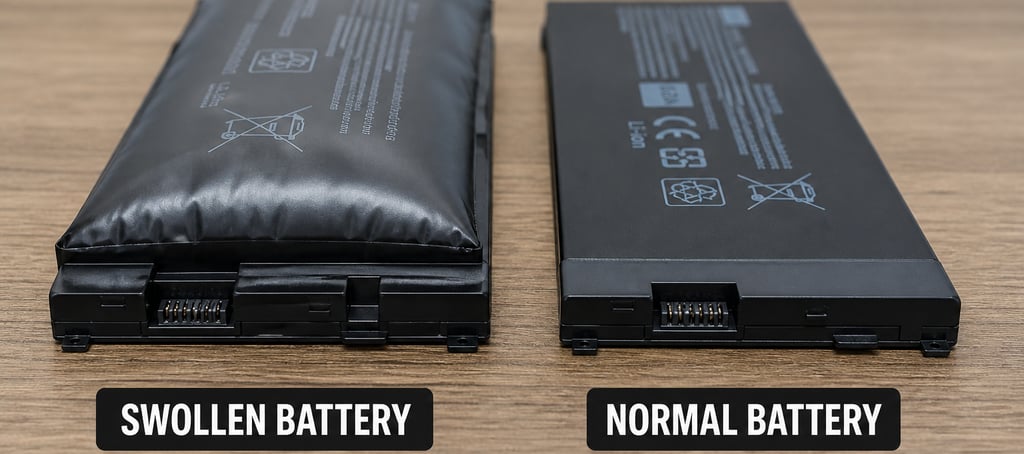
Battery wear report – We measure your battery's actual health and tell you when to replace it – before it swells or dies suddenly.
Port, hinge, and display cable test – Loose charging ports and worn hinges get worse over time. We identify weak points before they fail.
Fall Visit – Security and Software
OS plus all driver and firmware updates – We manually force every single update your automatic system misses (BIOS, SSD firmware, trackpad drivers, Wi-Fi card updates).
Password vault breach scan – Using HaveIBeenPwned integration, we check if your saved passwords have appeared in known data breaches.
Full backup restoration test – We do not just check if backup software says "success." We actually restore a random file to prove it works.
Phishing simulation result review – If you opt in, we send a safe test email to see if you would click a dangerous link. We review the results privately.
Removal of performance-killing bloatware – Old installer files, background startup programs, and unnecessary services are cleaned out.
Bonus: Mid-Cycle Email Alerts
Between visits, if our monitoring detects that your email address appears in a new data breach, we send you an immediate alert: "Your email was found in a new data breach – change your password now."
No other preventive service does this.
Pricing That Makes Sense (No Upsell Ambush)
We offer three clear plans. Annual plans lock in today's price – and prices will increase after our upcoming launch period.
Essential (remote) – from £39 per visit or £89 per year
Software scan, all OS/driver/firmware updates
Dark web breach check
Backup restoration test
Pro (in-shop) – from £89 per visit or £149 per year
Everything in Essential
Internal dust extraction
Thermal paste test
Battery wear report
Port and hinge check
Executive (on-site + loaner) – from £189 per visit or £289 per year
Everything in Pro
We come to your home or office
Loaner laptop provided
Printed 1-page security report card
Annual plans lock in today's price. Prices increase after [03/06/2026].
One-Time Services (Add-Ons)
Free diagnostic (15 minutes – battery, backup, breach check) – £0
SSD upgrade (256GB) – from £64
SSD upgrade (512GB) – from £84
SSD upgrade (1TB) – from £114
Battery replacement (parts and labour) – from £79
Fan replacement (parts and labour) – from £59
Thermal paste replacement – £29
Virus and malware removal (full scan and cleanup) – from £49
Data recovery (evaluation and attempt) – from £179
Emergency same-day visit (within 2 hours) – from £129
Guarantee
Try one Pro visit from £89. If you do not notice a faster, cooler-running laptop, or if you are not more confident in your security, we will refund 100% of your money. Terms & Conditions apply!
The "Fine" Trap: What Everyone Says Before Disaster
"My laptop runs fine."
We hear this constantly. And then, three days later, the blue screen appears.
Here are three real examples from our workbench last month.
The graphic designer's MacBook
She said her trackpad felt "a little puffy." We opened the case. The battery had swollen to twice its normal size and was pressing against the case. It was weeks away from rupturing – a fire hazard. She had no idea.
The accountant's Windows PC
Her backup software said "successful" for eight months. During our restore test, we discovered the external drive had died silently months ago. She would have lost every client file.
The freelance writer
She was ready to buy a new laptop because hers felt slow. We cleaned out 23% performance loss from dust alone. After service, she said: "I did not know this laptop could feel new again."
The 6-Month Shield would have caught every single one – before the emergency.
Objections We Hear (And Why They Do Not Hold Up)
"I have antivirus."
Antivirus is a seatbelt. It helps with common threats. It does nothing for firmware exploits, failing fans, swollen batteries, or corrupted backups. We cover all of that.
"I update when it asks."
No, you do not. Windows Update and macOS Software Update miss drivers, BIOS updates, SSD firmware, and many security patches. We force every single one manually.
"It is just too expensive."
Emergency data recovery costs £700 or more (and there is no guarantee). A new laptop costs £1,000 or more. Our bi-annual Pro plan is £149 for the entire year. That is about 40 pence per day. Which is actually expensive?
"I will just wait until something breaks."
That is like waiting for your car's brakes to fail before checking them. We are open every day except holidays – but after the crash, your data may already be gone.
How It Works: Simple, No Thinking Required
We designed this service for busy people who do not want to remember another task.
Step 1 – Book online
Choose Essential, Pro, or Executive. Pick a date and time that works for you.
Step 2 – We remind you
One week before each six-month appointment, you get an email or text reminder. No calendar management needed.
Step 3 – Service day
You drop off your laptop (Pro) or we come to you (Executive). Average service time is 90 minutes. For Executive, you get a loaner laptop so you can keep working.
Step 4 – You get a report card
We give you a one-page "Before vs After" summary showing your laptop's speed, security score, battery health, and any issues found.
Step 5 – Repeat in six months
No thinking. No remembering. Just protection that happens automatically.
What Our Customers Say
"I did not know a 5-year-old laptop could feel new again."
– Marcus T., small business owner
"They found a backup failure that would have cost me client contracts."
– Linda R., real estate agent
"I used to wait for popups to update. Now I just get an email that it is done."
– David K., remote developer
Stop Waiting for a Crash
Your laptop is a target. Every day you wait, dust accumulates, firmware ages, backups drift toward failure, and your passwords sit in breach databases you do not know about.
You do not need a new laptop. You need a 6-Month Shield.
Book your first visit today. Your future self – and your data – will thank you.
Book your first 6-Month Shield visit today
Visit ituktechteam.com/6-month-shield or call 01494240083/07963209527
About the author
This article was written by the team at IT-UK Tech Team, specialists in preventive laptop health. We offer remote, in-shop, and on-site services across the UK. Learn more at ituktechteam.co.uk
APPOINTMENTS LINE
Email: support@ituktechteam.co.uk
+44-1494 240 083 or 07963209527
Purchases via Amazon links support this site at no additional cost to you
Expert advice. Very good deals.